



2026 में सबसे ज्यादा काम आने वाले Top 10 AI Tools, जानिए इनके इस्तेमाल और कौन-सा टूल है Free या Paid
नई दिल्ली: आर्टिफिशियल इंटेलिजेंस यानी AI अब केवल तकनीकी विशेषज्ञों तक सीमित नहीं रह गया है। पढ़ाई, कंटेंट राइटिंग, वेब डेवलपमेंट, प्रोग्रामिंग, रिसर्च, ग्राफिक डिजाइन, वीडियो निर्माण और बिजनेस जैसे लगभग हर क्षेत्र में AI टूल्स का इस्तेमाल तेजी से बढ़ रहा है।
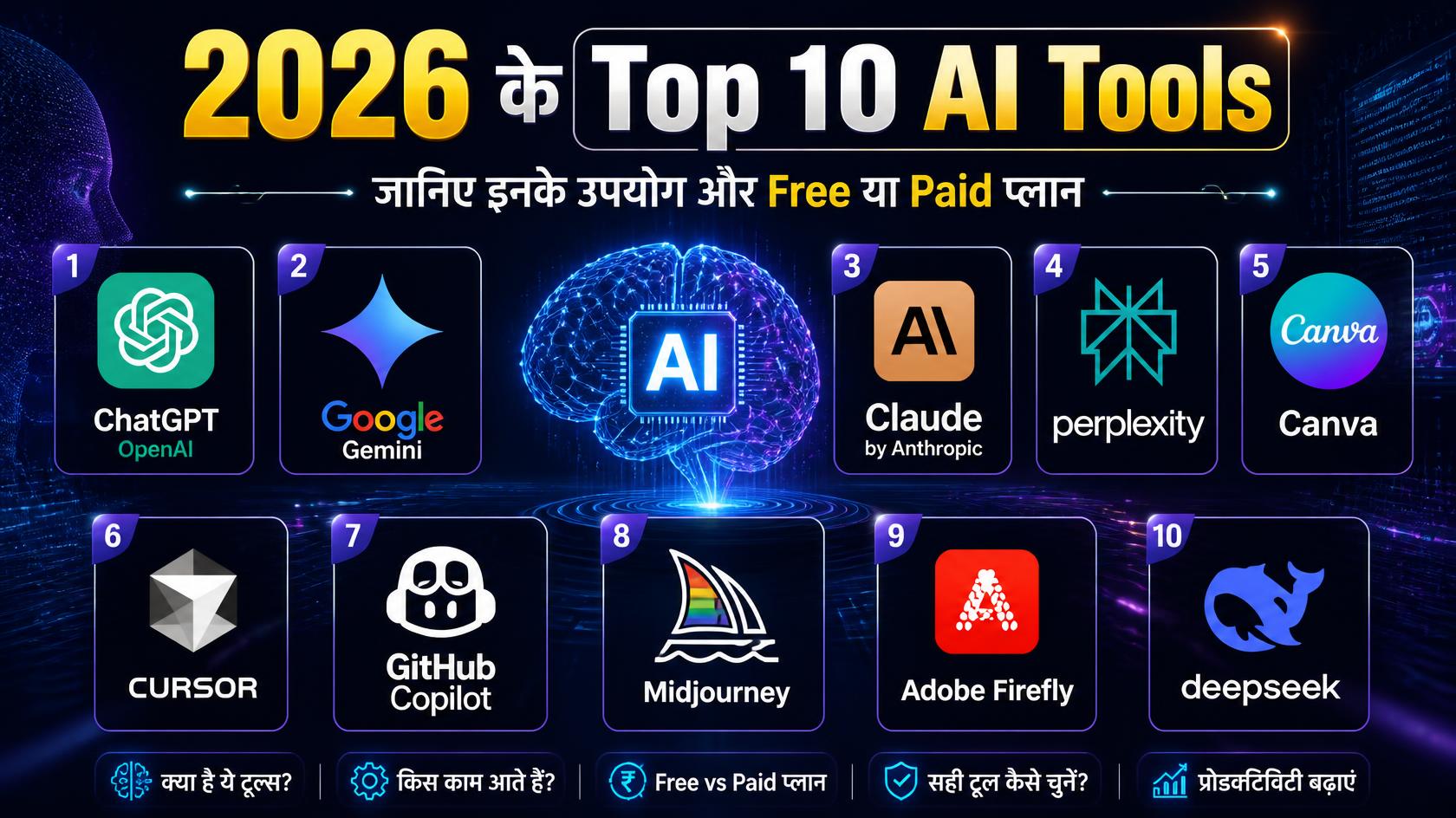
2026 के Top 10 AI Tools
आज बाजार में सैकड़ों AI टूल उपलब्ध हैं, लेकिन इनमें से कुछ टूल ऐसे हैं जो छात्रों, शिक्षकों, डेवलपर्स, कंटेंट क्रिएटर्स, पत्रकारों, डिजाइनर्स और बिजनेस प्रोफेशनल्स के लिए खास तौर पर उपयोगी साबित हो रहे हैं।
यहां जानिए 2026 के Top 10 AI Tools, उनके प्रमुख उपयोग, किसके लिए उपयोगी हैं और इनमें से कौन-से टूल Free हैं और किनके लिए Paid Subscription लेना पड़ता है।
नोट: AI कंपनियां अपने मॉडल, फीचर्स, उपयोग सीमा और कीमतों में बदलाव करती रहती हैं। इसलिए किसी भी टूल का Paid Plan लेने से पहले उसकी आधिकारिक वेबसाइट पर मौजूदा कीमत और फीचर्स जरूर जांचें।
1. ChatGPT – एक ऑल-राउंड AI Assistant
कंपनी: OpenAI
उपलब्धता: Free + Paid Plans
सबसे उपयोगी: Writing, Research, Coding, Learning, Analysis, Content Creation
ChatGPT आज सबसे लोकप्रिय AI assistants में से एक है। इसका इस्तेमाल केवल सवालों के जवाब पाने के लिए नहीं, बल्कि लेख लिखने, प्रोग्रामिंग, डेटा का विश्लेषण करने, दस्तावेजों के साथ काम करने, आइडिया तैयार करने और रिसर्च जैसे कई कामों में किया जा सकता है।
Free version में भी कई उपयोगी क्षमताएं उपलब्ध हैं, जबकि Paid Plans में अधिक usage limits और advanced features मिलते हैं। OpenAI के मौजूदा प्लान्स में Free, Go, Plus और Pro जैसे विकल्प शामिल हैं।
ChatGPT का इस्तेमाल कहां कर सकते हैं?
- न्यूज और आर्टिकल का ड्राफ्ट तैयार करने में
- ईमेल और रिपोर्ट लिखने में
- JavaScript, Python, PHP आदि की coding में
- कोड में error खोजने में
- विद्यार्थियों के लिए concepts समझने में
- PDF और documents का analysis करने में
- brainstorming और content planning में
- research और data analysis में
- image generation और editing में
- AI-powered productivity workflows बनाने में
Free या Paid?
Free: हां, सीमित usage के साथ
Paid: हां, अधिक usage और advanced capabilities के लिए
किसके लिए बेहतर?
छात्र, शिक्षक, लेखक, पत्रकार, डेवलपर, मार्केटर और सामान्य यूजर्स।
2. Google Gemini – Google Ecosystem के साथ AI
कंपनी: Google
उपलब्धता: Free + Paid Plans
सबसे उपयोगी: Research, Writing, Images, Google Apps, Learning, Multimodal AI
Google Gemini को Google के AI ecosystem का प्रमुख assistant माना जा सकता है। यह text के अलावा images, documents और अन्य प्रकार के inputs के साथ काम कर सकता है।
Gemini को Gmail, Google Drive, Google Photos, Google Maps और Google Flights जैसी Google services के साथ इस्तेमाल किया जा सकता है। Google के अनुसार Gemini writing, brainstorming, learning, image generation और information खोजने जैसे कामों में मदद कर सकता है।
Gemini में अब video generation जैसी advanced capabilities भी उपलब्ध हैं, हालांकि कुछ advanced features के लिए Google AI plan की आवश्यकता होती है।
Gemini का इस्तेमाल कहां करें?
- Google Docs और Gmail के साथ productivity
- किसी document का summary बनाने में
- पढ़ाई और research में
- images बनाने और edit करने में
- brainstorming में
- presentations और content planning में
- Google services से जुड़े कामों में
- video generation और editing में
Free या Paid?
Free: हां
Paid: हां, अधिक usage और कुछ advanced features के लिए
किसके लिए बेहतर?
Google Workspace users, students, teachers, researchers और content creators।
3. Claude – Writing और Coding के लिए मजबूत AI
कंपनी: Anthropic
उपलब्धता: Free + Paid Plans
सबसे उपयोगी: Long-form Writing, Coding, Research, Analysis
Claude को विशेष रूप से लंबे documents, complex instructions, writing और programming जैसे कार्यों के लिए काफी उपयोगी माना जाता है।
डेवलपर्स इसका इस्तेमाल code समझने, सुधारने और नए software components तैयार करने में कर सकते हैं। वहीं writers और researchers लंबे documents और complex information के साथ काम करने के लिए इसका उपयोग कर सकते हैं।
Anthropic ने Claude को coding और knowledge work के लिए लगातार विकसित किया है और 2026 में इसके नए models तथा research-focused capabilities भी सामने आए हैं।
Claude के प्रमुख उपयोग
- लंबे articles और reports लिखना
- documents का analysis
- programming और debugging
- research assistance
- business documents तैयार करना
- complex information को सरल भाषा में समझाना
- brainstorming
- technical documentation
Free या Paid?
Free: हां, सीमित usage के साथ
Paid: हां, ज्यादा usage और advanced models/features के लिए
किसके लिए बेहतर?
Developers, researchers, writers और professionals।
4. Perplexity – AI आधारित Research और Search Tool
उपलब्धता: Free + Paid
सबसे उपयोगी: Web Research, News Research, Fact Finding
Perplexity पारंपरिक search engine और AI chatbot के बीच का अनुभव देता है। इसका सबसे बड़ा फायदा यह है कि यह web से information खोजकर जवाब देता है और answers में sources/citations भी दिखाता है।
Perplexity का Free plan उपलब्ध है, जबकि Pro plan में ज्यादा usage, advanced AI models, Deep Research और अन्य capabilities मिलती हैं।
Perplexity का इस्तेमाल
- किसी विषय पर research
- latest information खोजने में
- news research
- competitor research
- academic research
- source verification
- किसी topic का quick overview
- कई websites से information को एक answer में समझने में
उदाहरण के लिए, यदि किसी पत्रकार को “भारत में AI jobs का 2026 में क्या trend है?” पर research करनी है, तो Perplexity कई online sources को देखकर एक structured answer तैयार करने में मदद कर सकता है।
Free या Paid?
Free: हां
Paid: Pro और अन्य premium plans उपलब्ध
किसके लिए बेहतर?
Journalists, students, researchers, bloggers और business professionals।
5. Canva AI – Design और Content Creation का आसान तरीका
कंपनी: Canva
उपलब्धता: Free + Paid
सबसे उपयोगी: Graphic Design, Social Media, Presentations, Images, Video
Canva लंबे समय से आसान graphic design के लिए लोकप्रिय है, लेकिन AI features ने इसे और ज्यादा powerful बना दिया है।
Canva AI के जरिए users conversational तरीके से design ideas तैयार कर सकते हैं, text generate कर सकते हैं और visual content बनाने में सहायता ले सकते हैं। Canva के अनुसार AI features Free plan से भी इस्तेमाल किए जा सकते हैं, हालांकि premium features और ज्यादा usage के लिए paid plans उपलब्ध हैं।
Canva AI से क्या बनाया जा सकता है?
- Social media posts
- YouTube thumbnails
- News graphics
- Presentations
- Posters
- Infographics
- Marketing creatives
- AI-generated images
- Videos
- Logo और branding material
Free या Paid?
Free: हां, AI tools की एक range के साथ
Paid: हां, premium assets और advanced features के लिए
किसके लिए बेहतर?
Students, teachers, social media managers, marketers, journalists और small businesses।
6. Cursor – AI के साथ Programming का नया तरीका
कंपनी: Cursor
उपलब्धता: Free/Limited + Paid
सबसे उपयोगी: Software Development और AI Coding
Cursor एक AI-powered code editor है जिसे खास तौर पर software developers के लिए बनाया गया है।
इसमें developer केवल code लिखने तक सीमित नहीं रहता। AI agent को किसी feature को बनाने, code समझने, changes करने या codebase में समस्या खोजने जैसे tasks दिए जा सकते हैं।
Cursor के अनुसार इसके AI agents पूरे codebase को समझकर code plan, write और review करने में सहायता कर सकते हैं।
भारत में developers के लिए Cursor ने Cursor Start नाम का ₹649 प्रति माह वाला plan भी पेश किया है।
Cursor के उपयोग
- Website development
- Web applications
- Debugging
- Code refactoring
- नए features बनाना
- Existing code समझना
- Documentation तैयार करना
- Software projects में AI agents का इस्तेमाल
Free या Paid?
Free: सीमित usage उपलब्ध
Paid: हां, अधिक usage और advanced capabilities के लिए
किसके लिए बेहतर?
Web developers, software engineers और programming students।
7. GitHub Copilot – Developers का AI Pair Programmer
कंपनी: GitHub / Microsoft
उपलब्धता: Free + Paid
सबसे उपयोगी: Coding, Code Completion, Code Review
GitHub Copilot developers को coding के दौरान AI assistance प्रदान करता है। यह code suggestions देने, functions लिखने, programming problems समझने और development workflow को तेज करने में मदद कर सकता है।
GitHub Copilot में Free plan उपलब्ध है, जबकि paid plans में ज्यादा capabilities और usage limits मिलती हैं।
GitHub Copilot का इस्तेमाल
- Code autocomplete
- Functions generate करना
- Code explain करना
- Bugs समझने में सहायता
- Refactoring
- Code review
- CLI-based development
- Software development workflow को तेज करना
GitHub के अनुसार Copilot developers की productivity बढ़ाने और coding के दौरान assistance देने के लिए बनाया गया है।
Free या Paid?
Free: हां, limited plan
Paid: हां, individual और business users के लिए
किसके लिए बेहतर?
Developers, programmers और software development teams।
8. Midjourney – AI Image Generation के लिए लोकप्रिय Tool
कंपनी: Midjourney
उपलब्धता: Paid Subscription
सबसे उपयोगी: AI Images, Creative Design, Concept Art
अगर AI-generated images की बात हो तो Midjourney सबसे चर्चित platforms में से एक है।
इसका इस्तेमाल text prompts से creative और highly detailed images बनाने के लिए किया जाता है। इसका उपयोग advertising, concept art, social media, creative projects और visual storytelling में किया जा सकता है।
Midjourney के मौजूदा plans Basic, Standard, Pro और Mega हैं। इनके monthly prices क्रमशः $10, $30, $60 और $120 हैं; annual billing पर discount उपलब्ध है।
Midjourney ने image creation के अलावा video generation और editing capabilities भी विकसित की हैं।
Midjourney का इस्तेमाल
- Featured images
- Concept art
- Advertising creatives
- Character design
- Product concepts
- Social media visuals
- Creative illustrations
- Storytelling और visual development
Free या Paid?
मुख्य plans Paid हैं।
किसके लिए बेहतर?
Graphic designers, artists, marketers, content creators और creative professionals।
9. Adobe Firefly – Professional Creative Work के लिए AI
कंपनी: Adobe
उपलब्धता: Free + Paid
सबसे उपयोगी: Image, Video, Audio और Creative Editing
Adobe Firefly को professional creative workflows को ध्यान में रखकर विकसित किया गया है। इसके जरिए AI-generated images, video, audio और अन्य creative content तैयार किया जा सकता है।
Adobe के अनुसार Firefly में image, video और audio generation सहित 30 से ज्यादा AI capabilities उपलब्ध हैं।
भारत में Firefly के लिए Free access के साथ paid plans भी उपलब्ध हैं। Adobe की मौजूदा India pricing के अनुसार Firefly Standard, Pro और अन्य higher tiers उपलब्ध हैं।
Firefly का इस्तेमाल
- AI images
- Image editing
- Background बदलना
- Creative assets बनाना
- AI video generation
- Audio generation
- Photoshop workflows
- Marketing creatives
- Commercial design projects
Free या Paid?
Free: सीमित daily generations
Paid: हां, ज्यादा generative credits और advanced capabilities के लिए
किसके लिए बेहतर?
Designers, photographers, video editors, marketers और creative agencies।
10. DeepSeek – Free AI का मजबूत विकल्प
कंपनी: DeepSeek
उपलब्धता: Free + Paid API
सबसे उपयोगी: Reasoning, Coding, Research, AI Development
DeepSeek ने AI market में अपनी अलग पहचान बनाई है। खासतौर पर reasoning और coding जैसे tasks के लिए इसका इस्तेमाल किया जाता है।
DeepSeek की official website के अनुसार उसके current models web और mobile app पर उपलब्ध हैं और users को free access दिया जाता है।
Developers के लिए DeepSeek API paid usage model पर आधारित है। 2026 में कंपनी ने DeepSeek-V4 lineup के साथ API pricing को भी update किया है।
DeepSeek के उपयोग
- Coding
- Mathematical reasoning
- Technical questions
- Research
- Text generation
- Problem solving
- AI applications develop करना
- API के माध्यम से software में AI जोड़ना
Free या Paid?
Web/App: Free access
API: Usage-based paid model
किसके लिए बेहतर?
Students, programmers, researchers और AI developers।
Top 10 AI Tools की एक नजर में तुलना
| AI Tool | मुख्य उपयोग | Free विकल्प | Paid विकल्प |
|---|---|---|---|
| ChatGPT | Writing, Coding, Research, AI Assistant | ✅ | ✅ |
| Google Gemini | Research, Google Apps, Images, Learning | ✅ | ✅ |
| Claude | Writing, Coding, Analysis | ✅ | ✅ |
| Perplexity | Web Research और Search | ✅ | ✅ |
| Canva AI | Design, Images, Presentations | ✅ | ✅ |
| Cursor | AI Coding और Development | सीमित | ✅ |
| GitHub Copilot | Coding और Code Assistance | सीमित | ✅ |
| Midjourney | AI Image Generation | मुख्यतः नहीं | ✅ |
| Adobe Firefly | Image, Video, Audio Creation | सीमित | ✅ |
| DeepSeek | Reasoning, Coding, Research | ✅ | API Paid |
किस काम के लिए कौन-सा AI Tool सबसे बेहतर?
सभी AI tools को एक ही काम के लिए इस्तेमाल करना जरूरी नहीं है। सही tool का चुनाव काम के अनुसार करना ज्यादा महत्वपूर्ण है।
पढ़ाई के लिए
ChatGPT, Gemini, Claude और Perplexity
इनका इस्तेमाल concepts समझने, notes बनाने, questions तैयार करने और research में किया जा सकता है।
Web Development के लिए
Cursor और GitHub Copilot
Coding, debugging, code explanation और software development में ये ज्यादा उपयोगी हैं।
News और Research के लिए
Perplexity, ChatGPT और Gemini
Perplexity source-based web research के लिए विशेष रूप से उपयोगी हो सकता है, जबकि ChatGPT और Gemini research के बाद content को structure करने में मदद कर सकते हैं।
Graphic Design के लिए
Canva AI, Midjourney और Adobe Firefly
Social media creatives के लिए Canva आसान विकल्प है, जबकि Midjourney और Firefly अधिक advanced creative workflows में उपयोगी हो सकते हैं।
AI Image और Video Creation के लिए
Midjourney, Adobe Firefly और Gemini
इन platforms में अलग-अलग स्तर पर image और video generation capabilities उपलब्ध हैं। Gemini में video generation के लिए कुछ paid/qualifying plans की आवश्यकता हो सकती है।
Programming के लिए
Cursor, GitHub Copilot, Claude, ChatGPT और DeepSeek
इन tools की मदद से coding से लेकर debugging और code explanation तक कई tasks तेजी से किए जा सकते हैं।
क्या Free AI Tools पर्याप्त हैं?
अगर कोई छात्र, beginner या सामान्य user AI सीखना शुरू कर रहा है तो शुरुआत में Free Plans पर्याप्त हो सकते हैं।
उदाहरण के लिए:
ChatGPT + Gemini + Perplexity + Canva AI + DeepSeek
का combination बिना बड़ी subscription cost के writing, research, learning, basic design और productivity के लिए काफी उपयोगी हो सकता है।
लेकिन professional users के लिए Paid plans का फायदा तब मिलता है जब उन्हें ज्यादा usage limits, advanced models, faster processing, premium features या specialized workflows की आवश्यकता हो।
AI Tool चुनते समय इन बातों का रखें ध्यान
AI tool चुनते समय केवल यह देखना पर्याप्त नहीं है कि कौन-सा tool सबसे popular है। आपको इन बातों पर भी ध्यान देना चाहिए:
1. आपका काम क्या है?
Writing के लिए जरूरी नहीं कि वही tool image generation के लिए भी सबसे अच्छा हो।
2. Free limit कितनी है?
कई tools Free होते हैं, लेकिन daily या monthly usage limits रखते हैं।
3. Data Privacy कैसी है?
Confidential business documents या personal information upload करने से पहले संबंधित AI service की privacy policy जरूर पढ़ें।
4. AI-generated content को verify करें
AI कभी-कभी गलत या outdated information भी दे सकता है। खासतौर पर news, medical, legal, financial और academic content में facts को independently verify करना जरूरी है।
5. Copyright और commercial usage
AI-generated images, videos और text को commercial purpose में इस्तेमाल करने से पहले संबंधित tool की licensing और usage terms जरूर देखें।
2026 में AI tools केवल productivity बढ़ाने वाले software नहीं रह गए हैं, बल्कि ये काम करने के तरीके को बदलने वाले digital assistants बन चुके हैं।
जहां ChatGPT, Gemini और Claude general-purpose AI assistance देते हैं, वहीं Perplexity research के लिए, Cursor और GitHub Copilot coding के लिए, Canva AI design के लिए तथा Midjourney और Adobe Firefly creative content generation के लिए ज्यादा उपयोगी हैं। दूसरी ओर DeepSeek free AI access और technical/reasoning workflows के लिए एक महत्वपूर्ण विकल्प बनकर सामने आया है।
हालांकि, सबसे अच्छा AI tool वही है जो आपके specific काम, budget और workflow के हिसाब से सही बैठता हो। इसलिए सभी tools की subscription लेने के बजाय पहले उनके Free versions को आजमाना और जरूरत के अनुसार Paid plan चुनना ज्यादा बेहतर रणनीति हो सकती है।
- 2026 में सबसे ज्यादा काम आने वाले Top 10 AI Tools, जानिए इनके इस्तेमाल और कौन-सा टूल है Free या Paid
 नई दिल्ली: आर्टिफिशियल इंटेलिजेंस यानी AI अब केवल तकनीकी विशेषज्ञों तक सीमित नहीं रह गया है। पढ़ाई, कंटेंट राइटिंग, वेब डेवलपमेंट, प्रोग्रामिंग, रिसर्च, ग्राफिक डिजाइन, वीडियो निर्माण और बिजनेस जैसे लगभग हर क्षेत्र में AI टूल्स का इस्तेमाल तेजी से बढ़ रहा है। 2026 के Top 10 AI Tools आज बाजार में सैकड़ों AI टूल…
 - Cyber Sakhi: गांव की महिलाओं को साइबर ठगी से बचाएगी नई पहल, 2029 तक 10 लाख महिलाओं को जोड़ने का लक्ष्य
 Cyber Sakhi: 10 लाख महिलाओं को मिलेगी साइबर सुरक्षा की ट्रेनिंग
 - India’s IT Hiring Market Shows Signs of Recovery as AI, Cloud and Digital Skills Gain Importance
 India’s technology employment hiring market is showing fresh signs of recovery after a prolonged period of relatively cautious hiring
 - What are the latest innovations in travel tech for 2025?
 Lorem ipsum dolor sit amet, consectetur adipiscing elit. Nulla a dapibus erat, ac volutpat tellus.
 - How do you handle conflicts within your team?
 Lorem ipsum dolor sit amet, consectetur adipiscing elit. Nulla a dapibus erat, ac volutpat tellus.